Microsoft Power BI
VerifiedEditor's ChoiceScalable enterprise business intelligence and interactive financial visualization suite
Microsoft Power BI is the world's most popular business intelligence platform, allowing finance teams to transform raw financial data into interactive dashboards, DAX metrics, and executive reports.
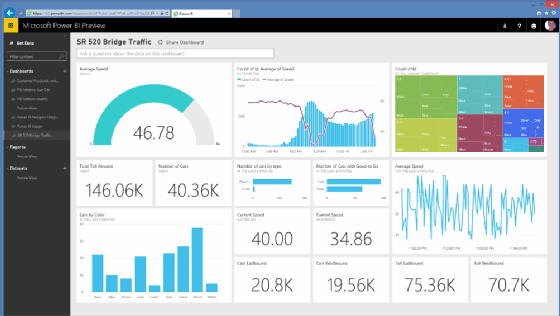
What is Microsoft Power BI?
Microsoft Power BI is the uncontested default analytics standard for corporate finance teams and CFOs worldwide. With native connectivity to Microsoft Excel, Azure, SQL Server, NetSuite, Salesforce, and hundreds of cloud data warehouses, Power BI bridges the gap between spreadsheet modeling and enterprise data engineering. Power BI Desktop is completely free, providing access to DAX formulas and data modeling.
You can access the platform directly via the official Microsoft Power BI official website (powerbi.microsoft.com), where you can start immediately without registering an account across Windows, Web-based, iOS, Android, Excel.
Microsoft Power BI Benefits & Disadvantages
An objective breakdown of where Microsoft Power BI excels and what limitations to keep in mind.
Key Benefits & Strengths
Why creators & developers choose Microsoft Power BI- ✓Scale from a Single Excel User to Global Enterprise
Empowers financial analysts to build enterprise-grade data models without waiting for IT engineering sprints.
- ✓Lowest Cost of Ownership in Business Intelligence
Power BI Desktop is completely free, and cloud sharing starts at just $10/user/month, a fraction of competitors like Tableau.
- ✓500+ Native Data Connectors
Connects out-of-the-box to Snowflake, Google BigQuery, PostgreSQL, Salesforce, QuickBooks, and SAP.
Disadvantages & Trade-offs
Limitations to consider before adopting- −Power BI Desktop is Windows Only
The full authoring desktop application runs natively only on Windows; Mac users must use cloud browser authoring or run a virtual machine.
- −DAX Formulas Have a Steep Learning Curve
Mastering complex Data Analysis Expressions (DAX) for advanced time-intelligence metrics requires dedicated study.
Core Features & Capabilities
Standout technical capabilities included in Microsoft Power BI.
Design, model, and visualize complex multi-source financial reports on your Windows desktop with zero licensing fees.
Connect directly to live Power BI semantic data models from Microsoft Excel pivot tables without exporting CSV files.
Perform advanced financial math: Year-over-Year (YoY) variance, rolling 12-month EBITDA, and dynamic currency conversions.
Use generative AI to draft executive report summaries, suggest relevant visual charts, and write complex DAX code automatically.
How to Get Started with Microsoft Power BI
Navigate to powerbi.microsoft.com to explore guided product tours or access the live workspace.
Link your company bank feeds, ERP ledgers, and team members with granular permission roles.
Track real-time cash flows, execute automated reconciliations, and generate executive KPI reports.
Best Use Cases
- •Daily business intelligence & analytics workflows for developers, designers, and indie founders
- •Replacing costly SaaS subscriptions with a freemium industry standard
- •Rapid prototyping, automation, and production delivery in finance & accounting projects
Free Tier & Licensing Details
Power BI Desktop is 100% Free Forever for authoring reports on Windows; Power BI Pro cloud sharing is $10/user/month (included in Microsoft 365 E5).
Frequently Asked Questions about Microsoft Power BI
Yes. Power BI Desktop is 100% free forever for building data models, connecting to databases, and viewing visual reports on your computer.
To publish and share interactive reports securely in the cloud with colleagues, users need a Power BI Pro license ($10/user/month, or included in Microsoft 365 E5).