Xero
VerifiedEditor's ChoiceIntuitive cloud accounting software with 1,000+ app integrations for SMBs and firms
Xero is a beautifully designed cloud accounting platform for small-to-medium businesses and accounting practices, offering automated bank feeds, intuitive invoicing, expense claims, and unlimited collaboration seats.
What is Xero?
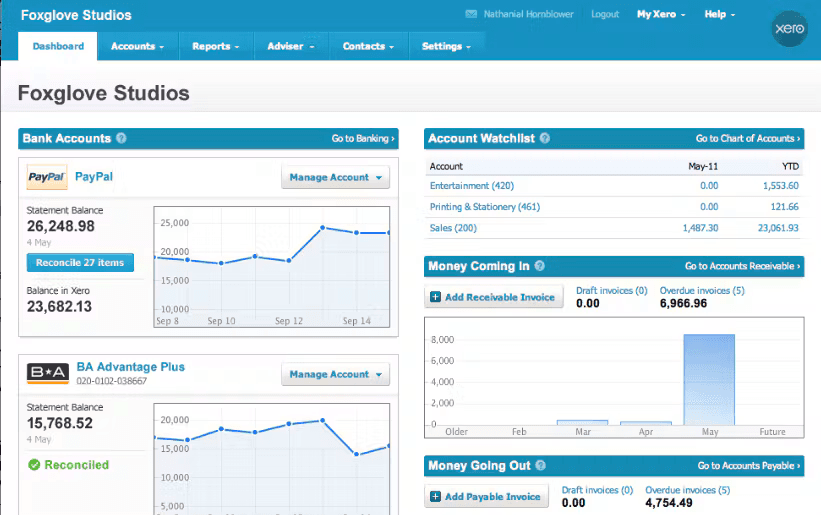
Loved by founders, small business owners, and outsourced bookkeeping firms worldwide, Xero transforms accounting into a collaborative, stress-free experience. Unlike legacy desktop software, Xero was built natively for the web with an open API and an app marketplace containing over 1,000 integrations. It delivers daily automated bank feeds, smart rule-based matching, online invoice payment links, and multi-currency tracking.
You can access the platform directly via the official Xero official website (xero.com), where you can create a free workspace across Web-based, iOS, Android, macOS, Windows.
Xero Benefits & Disadvantages
An objective breakdown of where Xero excels and what limitations to keep in mind.
Key Benefits & Strengths
Why creators & developers choose Xero- ✓No Extra Charge per Team Member
Unlike software that penalizes growth with per-seat licensing, Xero plans include unlimited users.
- ✓Massive Ecosystem of 1,000+ Verified Add-Ons
Easily plug in payroll, inventory, e-commerce (Shopify), CRM, and specialized industry extensions.
- ✓Zero IT Maintenance or Backup Hassles
100% cloud-hosted with automatic encrypted backups, multi-factor authentication, and mobile receipt capture apps.
Disadvantages & Trade-offs
Limitations to consider before adopting- −Invoice Limits on Entry-Level Tier
The entry-level Early plan is capped at 20 invoices and 5 bills per month, necessitating an upgrade for growing transaction volumes.
- −Not a Heavy Manufacturing ERP
Businesses with complex multi-warehouse manufacturing or matrix inventory requirements will need specialized third-party ERP add-ons.
Core Features & Capabilities
Standout technical capabilities included in Xero.
Connect directly to thousands of international financial institutions with machine-learning transaction categorization.
Invite your entire finance team, external CPAs, and bookkeepers with granular permission controls at no extra charge per user.
Send professional invoices with embedded 'Pay Now' buttons linking to Stripe, GoCardless, and PayPal for faster settlement.
Send quotes, issue bills, and track bank accounts in over 160 foreign currencies with automatic exchange rate updates.
How to Get Started with Xero
Navigate to www.xero.com to explore guided product tours or access the live workspace.
Link your company bank feeds, ERP ledgers, and team members with granular permission roles.
Track real-time cash flows, execute automated reconciliations, and generate executive KPI reports.
Best Use Cases
- •Daily cloud accounting workflows for developers, designers, and indie founders
- •Replacing costly SaaS subscriptions with a free to try industry standard
- •Rapid prototyping, automation, and production delivery in finance & accounting projects
Free Tier & Licensing Details
30-day unlimited free trial with zero credit card required; Early plan begins at $15/month, Growing plan at $42/month, and Established plan at $78/month.
Frequently Asked Questions about Xero
Yes. You can test every feature of Xero for 30 days without entering any credit card details.
Xero is celebrated for its clean, modern interface, unlimited user policy, and exceptional partner ecosystem for external bookkeepers, while QuickBooks is popular for US tax preparation.
Yes. You can invite your external accountant or tax advisor with custom access rights so they can review ledgers and generate year-end reports directly.